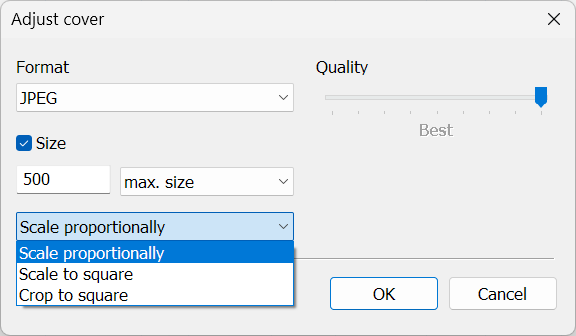
I have gratefully discovered an function within the MP3tag that I wanted to share about and let you know that it is something that as small and seemingly inconsequential as it may sound, is extremely helpful. It lies within the image box in the left hand panel. When you copy and paste an album cover in it and then right click there appears a choice called "adjust cover". I'm excited about this because I have always been going outside of the program or snipping it to get a smaller size of the album cover. This little discovery will save me tons of time. So I just wanted to express my thanks, so thank you...johnnos12
AFAIK, "Adjust cover" is available since Mp3tag v3.01 (released in March 2020):
In the meantime, you can also adjust your copy & pasted cover "proportionally", "scale to square" and "crop to square" in addition to its size and quality.