Lines being blanked and folders being created. What's going on?

I've just started using mp3tag and some strange things are happening. Some rows are just being blanked for no apparent reason. I've no idea why. I'm using the latest version. Sometimes it's just one row in mp3tag and sometimes multiple rows.

Also, I only use years for all music, but the full date is appearing. I have no idea what is going this.

Also, I don't know if this is mp3tag or the dopamine music player that I've also started using, but when I create a genre a directory of that name appears in my music folder of the same name as the genre and all music files of that genre appear there. Then in mp3tag I suddenly see music files duplicated, one for the old folder name and one for the new name.

So, I after marking some music files as Blues a directory called Blues appeared with all the albums I gave that genre to.

I've no idea which program is doing it, or whether I have selected some option that does it, but it is so, so annoying.

Can someone please tell me why this is happening?

I want to only set metadata for my music in mp3tag manually and NEVER have anything changing it. And I certainly don't want random folders/directories being created.

I've never seen anything like this happen before.

Dopamine seems like a new music program. It has a simple interface and is fast, but whether it is mp3tag or Dopamine, creating these folders can some one please tell me how to stop it?
You would have to tell us what kind of files these are, which functions in MP3tag you are using, supply screenshots of the metadata an other parameters, in short, please follow

Or: MP3tag does not create folders unless you tell it to do so.
If you have problems with the functions of that player, please consult their support.

Is that a joke? What difference does it make what type of files they are or what functions I'm using?

They are music files being read by mp3tag and lines suddenly go blank. One minute a track has full track listing and the next it is a blank line.

As I cannot look over your shoulder you would have to supply more information.
The behaviour that you describe

is nothing that I observe so I would need some hints on the circumstances to reproduce it in order to think of ways out.

Please describe the process step by step so that others can reproduce it even if they can't see your screen.
Start with the description like this:
a) I load an album with 12 mp3 tracks into Mp3tag and see this:
-> Show us a screenshot
b) Then I click with my mouse on track #3 and this line "go blank"
-> Show us a screenshot

This will help us to try and imagine what could happen in your case.

Well we have to start somewhere and your initial post didn't provide much detail.

A screenshot or two will show more information than what you can describe. Especially the "blank line" part that is not a common occurrence.

As far as creating these mystery folders under a genre, did you use any particular action from within mp3tag at all? Because there is no mechanism to automatically do anything, mp3tag only acts upon your direction.

I would suspect your "new" player is more likely doing something. Perhaps in the settings there is a function to organize your library. I would look for anything along those lines and disable it to prevent any unwanted and unexpected changes to your library.

All I wanted to know is whether anyone else had these issues and whether anyone could tell me what option I might have selected by mistake, or more likely, whether there was a new feature in the latest release that is doing it. Or, whether it is a bug. If it is a bug I thought someone might want to know.

The blank line issue is very simple. My files are FLAC. I run mp3tag and it displays all the files. Nothing wrong. I'm merely changing the cover art. No more.

Then suddenly a line that contained all the track info becomes blank. Sometimes one track, sometimes more. As for screenshots, I fix it, so there are no screenshots. But if there were, they would just show blank info for one, or more, tracks.

Sometimes a date that is year only suddenly has year, month and day. Again, I wondered if this was a feature that I needed to turn off. mp3tag is clearly getting the data from somewhere.

But I was more interested in the new folders being created. I wondered if that was some new feature of mp3tag. I have NOT selected any "clever" options in mp3tag. I'm merely replacing the cover art, nothing more.

You maybe right, that it is more likely to be dopamine, but I thought people might have seen it and can advise. Whichever program is doing it, I cannot conceive of a reason why anyone would want it to do such a thing, but I thought someone might be able to advise of a reason for it. I've never seen it before in any other player or in mp3tag. In mp3tag it becomes annoying because suddenly all the data is repeated as mp3tag is finding all the files twice. It totally confused me until I worked out what was happening, and I still cannot work out why anyone would want it. I really thought someone might have seen it and can explain. Nothing more.

As I cannot think of a reason why anyone would want it I found it difficult to work out why either program would do it, but I cannot see why any music player would mess with the metadata at all, let alone creating folders and copying files. I am quite impressed with dopamine as a player but baffled if it is doing this.

If you're serious about finding a solution, stop using "Dopamine".
Use only Mp3tag for a week or so instead, and let us know if you notice anything unusual, such as "lines being blanked out" or "folders being created".

If you can't replicate this behaviour during this test period, you'll know exactly what the problem is.

As long as you are using both tools, it is nearly impossible to pinpoint the source of the problem.

And to be clear:
Mp3tag does not create folders automatically.
Mp3tag also does not remove files on its own.
You always have to perform an Action, press a specific shortcut or enter further information to achieve this.
Nothing will be executed automatically in the background without your command.
There are also no scheduled tasks that perform something every hour or so in Mp3tag.

Even if you think that this might be a bug then you would have to supply more details so that others can reproduce the behaviour.
Sample files would such a thing, for example, preferably an unaltered orginal and one after the treatment.
So far I would say: all of this has nothing to do with MP3tag in its default settings and the observed behaviour either is caused by external programs or user-interaction.
But without further details, I can only guess.

A screenshot of a flac file's extended tags dialogue would reveal if there are other tags than flac Vorbis Comments are stored in that file.
This just as a justification why further information is requested in the shape of screenshots - sometimes 4 eyes see more than just 2.

I was asking simple questions and looking for simple answers. I don't care whether, or not, it is a bug, and I'm not going to spend time doing screenshots. I have way too much to do. Sorry if that offends you, but mp3tag is just a tool to get things done to me. I think the developer has done a fantastic job, and many people on here seem to want to help fix bugs, but I just want to use it. If it has simple flaws that is okay if I can work around them.

All I wanted to know was whether I was doing something stupid. End of story.

As for dopamine, I have posted on GIT, but I can find no other way of contacting the developer, or any settings to change what it is doing. That is why I asked about folders on here.

This is the reply I just got from Dopamine developers.

"That's strange and I'm afraid that's not Dopamine doing that. Nothing in it's source code writes folders based on the Genres. Dopamine creates a Dopamine folder in your music folder, which in its turn contains a folder Playlists and Ratings. That's all for folder creation"

Based on your description, you’re not doing anything stupid.

I can confirm, that Mp3tag is also not creating those folders automatically. As others have said previously, it can do such things based on your direction (manually triggering converters or actions), but never acts without your intervention.

Thanks for the reply.

I wondered if I had set an option by mistake or hit a key combination to trigger something.

My use of mp3tag is somewhat basic. I changed the column order and I use the numbering function, plus get tags from files/send tags to files (probably the wrong terms). Other than that I just change the genres and cover art. Nothing sophisticated. I keep meaning to learn more but haven't had the time.

The only programs I have been using on my music files lately are mp3tag and then Dopamine to check that the tag changes I have made work.

I've gone through the Dopamine log file and there is nothing about creating folders. There is just the occasional error about tags being wrong/missing.

I assume from your reply that I would have had to have done something deliberately to create folders etc. in mp3tag. Is that correct?

I only spotted the new folders when I closed mp3tag and re-opened it to see if it fixed the blank lines. I was shocked to see files duplicated as mp3tag found files in these new folders.

By the way, is there a way to get mp3tag to resume on the file it was on when I closed it?

Yes, there are a few ways to create folders in Mp3tag:

  • Convert → Tag - Filename when you use the backslash to denote folders in the format string. This is documented here: Create Folder Structures based on Tags
  • Convert → Tag - Tag and Action Format value when you use _FILENAME or _DIRECTORY as field name.

Duplicating files is only possible in Mp3tag if you use Edit → Copy… (and it doesn't involve creating new directories).


And please create a new topic for any other questions unrelated to the original issue.

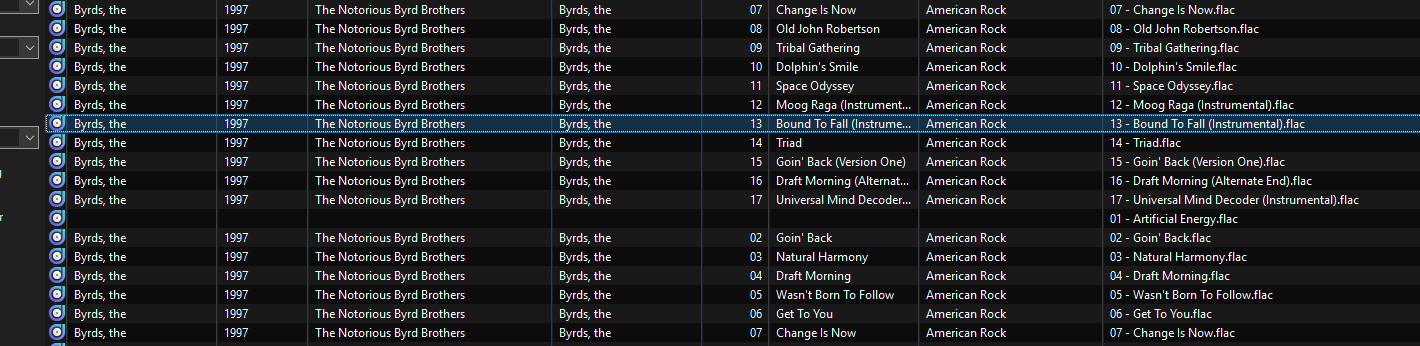
People wanted a screenshot. It doesn't show anything interesting.

I clicked in one of the fields on the line and the whole line was blanked up to the filename.

As I'm deleting it anyway I don't care why it does it.

This likely will happen if you load a directory with this file and then move this file without the help outside of Mp3tag or delete it outside of Mp3tag.
Mp3tag does not refresh the filelist you loaded in the background.
A click on a file in the columns refreshes the view and the tag content will disappear. A click on the refresh button will refresh the whole list of the loaded files and if the file is not there where it was it will no longer be shown.

Thank you poster. Thank you poster. I said it twice because once was too short apparently.