Hi there, every time I launch Mp3Tag it goes through the process of building the library/database, which takes a huge amount of time.
I have checked "Enable Library" in options, and I see "mp3tag.db3" in the correct location, but it still rebuilds database every time I open the app. Deleting the .db3 and rebuilding from scratch makes no difference.
How do you know that the library is rebuilt?
What kind of behaviour did you expect?
Please compare the found behaviour with the specified behaviour as found in the documentation:
How much time is a huge amount? And how many files are in your library?
On the first run without a library existing it will take longer to load. After closing mp3tag and reopening, the same library will load much faster assuming there have been no external changes to those same files.
Have you checked if your antivirus software e.g. windows defender blocks the mp3tag app or checks every time all your files? In this thread Windows Defender - Speed of loading files in MP3Tag you can find more help about this.
I currently have 7150 files and it takes about 2m30s to open the app.
It seems to only occur after a pc reboot. If I reopen mp3tag during the same boot session once the .db is built, it will be really fast (assuming this is the library reading the .db correctly). This is the case even if new files have been added/removed in the scanned folder.
I've added a Windows Firewall exception as in the linked solution above and will report back if the problem occurs and see if I can nail down a solid reproduction 
Another idea that hasn't been mentioned yet, and that you can check, is that the library is rebuilt when files have changed outside of Mp3tag since the app was last run.
I tested this yesterday and the library does not rebuild fully from scratch if you change any files in the scanned folders.
I've since had a PC reboot and just launched mp3tag and it is in fact building again from scratch, despite nothing having changed since PC shutdown yesterday night 
The Firewall exception therefore did not work, and this issue seems to be caused by PC rebooting, so something is changing during that process. Happy to keep trying repros to nail this down if anyone has any more suggestions!
You say so few things about the environment.
What kind of installation are you running? Standard or portable?
On what kind of mass storage is MP3tag installed?
Where are the files stored that MP3tag should read?
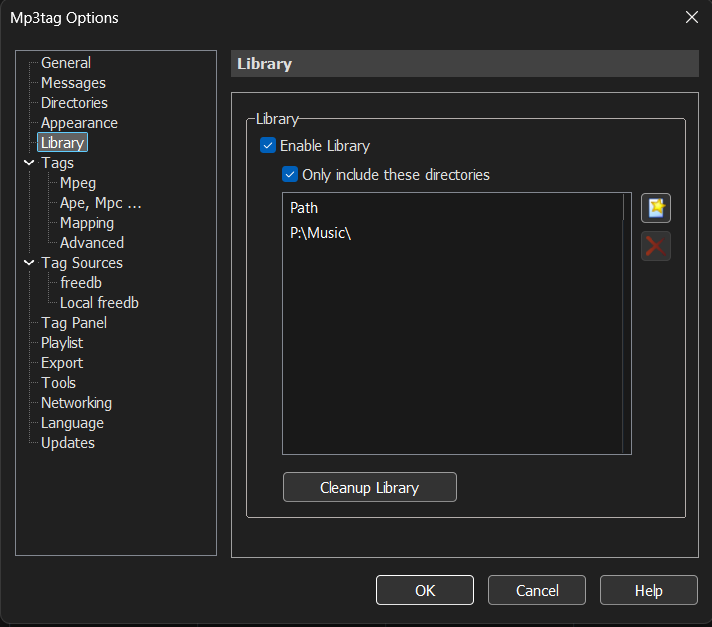
Please show us a screenshot of the library options.
I took your hint seriously and checked my library folder for a portable and a standard installation and rebooted my PC.
I could not detect any complete rebuilds for either.
Both installations start within a few seconds.
The portable installation, that I ran today in the morning, had a modification date of today and as time 9 o'clock sharp.
When I started MP3tag, a temporary file appeared so quickly, that I could hardly notice it and the db got an updated modification time of 18:33.
The db file is some odd 6GB in size. So that would have taken quite some time to rebuild. But the db was only updated.
What strikes me is that you repeatedly mention a firewall exception. Microsoft has been causing some confusion in this regard for a while now by also using the term "Windows Defender Firewall." Originally, the designation "Defender" applied solely to Windows' built-in antivirus software.
Therefore, the objective is to define an exception for the antivirus software - not for the firewall.
Windows Security -> Virus & threat protection -> Manage settings -> Exclusions -> Add or remove exclusions:
Process: mp3tag.exe
Solved!
Mp3tag opened in seconds after a fresh PC reboot, after adding the exception to Defender as described here. Thanks for the extra clarification.
For full clarity I added "Process: mp3tag.exe" but I also added mp3tag.exe as a "file" exception too, just in case. Either way, this worked. Thanks again.
For more clarity in case anyone finds this thread, or if it helps for a permanent fix for this:
- Portable installation
- Mp3tag.exe is on SDD
- The mp3 files to be read are on a different SDD
- Screenshot below: