MP3Tag Title not used as MKV Titles

Using VLC to play, the Title for an MKV movies doesn't show, it shows an embedded MKV Title instead.

MP3Tag Title = "s01e03 - Something" but the VLC display seems to be a different Title that I can find in the MKV file with MKVToolNix Info

Is there a different tag for MKV files, another way to do it, or what?

Is it just the way VLC is?

Thanks

Here is a thread that shows how to clear the VLC cache:

See if it works better with a cleared cache.

No difference -- the 'embedded' MKV title field is still displayed, not the MP3Tag field

see here on MKV chapters:

That title is probably the Header tag title, not the XML tag title. In my experience, an MKV or any Matroska file can have both. Depends on the media player on which title it would prefer to display. I think MPC-HC and MPC-BE favor the XML titles over the Header ones. The Header tags I believe are invented first, but limited only to a number of set tags, unlike XML which can have as many and as unofficially.

To edit Header tags, I use:

  1. MKVToolNix GUI (or its own CLI's)
  • Open MKVToolNix, click the main left tab called Header editor, you can drag and drop an MKV there. At the left pane, click Segment Information, then Title. Change the value at the right pane. But back at the left pane, there is Attachments at the lowest, where a cover or any attchment could be added and deleted. While MKVToolNix CLI exe's can be used in a Batch file to batch put/edit such header tags.

  • To directly invoke MKVToolNix GUI's Header editor main tab, I use this parameter in Mp3tag's Tools:
    --edit-headers "%_path%".

  • Anyway, there are new entries here which tackle lossless rotation in Matroska but not yet supported by players. For now an unofficial but recognized XML tag simply named as ROTATE (value can be 90, 180, 270 for example) could be put in to the video track for lossless auto-rotation during playback by the likes of MPC-HC, MPC-BE, and PotPlayer.

  1. JMkpropedit, which needs MKVToolNix's CLI exe's, since it's just a GUI for it. JMkpropedit can handle multiple files too.

To edit XML tags, I use:

  1. Mp3tag as main tagger, and most importantly as recursive batch tagger.

  2. chapterEditor as secondary, but more complex. For example, tag an MKV file with Mp3tag with as many tags as you could, then save, then open that same MKV file into chapterEditor to see the difference. As a user of Mp3tag, I think this should be the appearance, pattern, or arrangement of an external XML tag file that we should follow to prevent unwanted or conflicting display of XML tags.

In my personal practice, I just put the same value to both the Header and XML titles. Then when viewed with MediaInfo using its HTML View, the titles are separated with a slash. Quite far back in time, I used to create external XML files then put them inside using MVKToolNix.

I use MKVToolNix editor and info to peek inside

Since it was called "Title" I thought that MP3Tag was supposed to update it -- seemed logical to me anyway

However, I did find that since my ffmpeg batch file (used to remove non-English, non-forced subtitles, non-English audio tracks, and chapters from MKV files) has the -dn parameter that also removes the Segment-Title entry.

VLC then plays and displays the MP3Tag Title field.

Only problem is the time required to re-generate the file

You can use MKVToolNix's very own CLI exe's to batch remove the Header tags (like the Header's Title counterpart) fast and easily without remuxing.

For example, if I have a few MKV's inside a particular folder, I use something like below. This should remove the header title, by simply putting no value after the equal sign.

for %Z in ("*.mkv") do mkvpropedit.exe "%Z" --edit info --set title=

I highly recommend using MKVToolNix's CLI exe's instead of FFmpeg's because in my experience, FFmpeg removes or rearranges existing tags, or adds some unnecessary tags like stats and duration. I use FFmpeg to remux media files in the beginning, like after I have downloaded YouTube videos. Then I use MKVToolNix for final remuxing.

For example, I have finished tagging an MKV file with Mp3tag and the other apps, but after I remuxed it with FFmpeg, the tags displayed in MediaInfo is different from what I originally intended. Even by extracting the tags to an external XML file, it is different.

Also if I may add, for anybody. I recommend remuxing those downloaded MP4's and WebM's from YouTube using FFmpeg first to the same format, then tag those instead by Mp3tag and other taggers.

Thanks for the tip -- I looked into mkvpropedit.exe's CLI options. Seems like it would work just to delete/change Headers.

My current batch file removes subtitles, non-English audio tracks, chapters, and some data elements, but it does re-mux. I didn't see those as features of mkvpropedit.

I think I'll implement your suggestion into a new batch for when I only need to strip the Titles (and maybe some others). It would be faster

Actually, I don't think my ffmpeg batch file reencodes, it just rewrites the necessary streams (right term)?

UPDATE: Indeed, your FFmpeg batch probably does not re-encode. But I still highly recommend MKVToolNix to strip Matroska titles and other Header tags especially since the program was updated maybe last one or two months or so ago, to support emojis and smilies. Not sure if FFmpeg could preserve such unique characters.

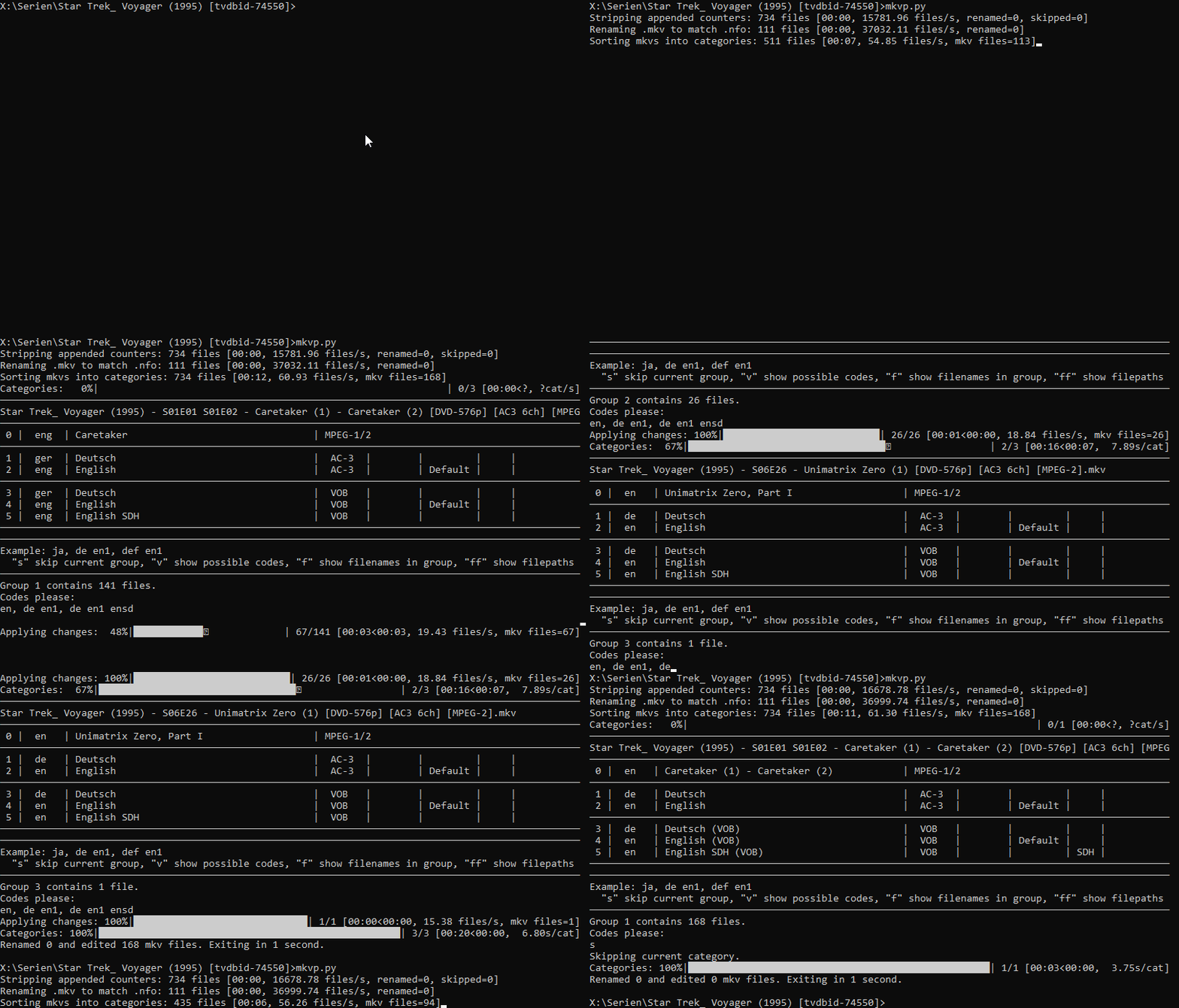
I've solved this issue in my python script mkvpropr by setting the file title based on the title in matching .nfo files (that tinyMediaManager generates for each of my movies/tv show episodes).
Example movie .nfo excerpt:

<?xml version="1.0" encoding="UTF-8" standalone="yes"?>
<!--created on 2024-08-26 20:19:13 - tinyMediaManager 5.0.9-->
<movie>
  <title>Der Blade Runner</title>
  <originaltitle>Blade Runner</originaltitle>

The mkv file title would be set to Der Blade Runner.

And should that fail (no matching .nfo for example) it then tries to extract the title from the filename with 2 different regular expressions, 1 for movies and 1 for tv shows (which you can configure to match your naming scheme).

This allows me to set the file title (as well as track names and flags) for as many files as I want (the script is recursive) interactively in batches sorted by identical track combination and properties without rewriting the files.

Under the hood, my script uses mkvmerge (for track property extraction) and mkvpropedit for writing the changes to the files, both of which are included in MKVToolNix.

As you can see it's quite fast once you've configured it to match your naming style and preferences.

I've used it on a couple thousand movies and dozens of tv shows so unless you have very exotic files I'm pretty confident that it should work (I've worked on the script over the last 1,5 years).

Since I've only published it yesterday I'd love some feedback.

I'm just curious which MKV TargetTypeValue does your script use to write the TITLE into the MKV?

mkvpropedit_cmd = [
   "mkvpropedit",
   file_path,
   "--edit", "info", "--set", f"title={title}", # Comment this out if you don't want the file title to be set to the movie or episode name
   "--edit", "track:v1", "--set", f"name={title}", # Comment this out if you don't want the video track name to be set to the movie or episode name
   "--set" if video_track != "-" else "", f"language={video_track}" if video_track != "-" else "" # Only set video track language if it is not "-"
   ]

I'm asking that after reading this topic about TVSEASON.
Maybe something similar to the code above could be used to set the TVSEASON accordingly?

It sets the title in the segment info. I don't know about the target type.

MKVToolNix's Header Editor shows the result here:


mkvinfo shows it here:

+ EBML head
|+ EBML version: 1
|+ EBML read version: 1
|+ Maximum EBML ID length: 4
|+ Maximum EBML size length: 8
|+ Document type: matroska
|+ Document type version: 4
|+ Document type read version: 2
+ Segment: size 18870826262
|+ Seek head (subentries will be skipped)
|+ Segment information
| + Timestamp scale: 1000000
| + Multiplexing application: libebml v1.4.5 + libmatroska v1.7.1
| + Writing application: mkvmerge v86.0 ('Winter') 64-bit
| + Duration: 01:57:36.864000000
| + Date: 2024-08-26 18:19:38 UTC
| + Title: Der Blade Runner
| + Segment UID: 0xa3 0x41 0x40 0xbf 0xdb 0x24 0x1f 0x6f 0xc7 0x05 0x6f 0x13 0x39 0xa4 0x4d 0x20

ExifTool displays it as:

Date/Time Original              : 2024:08:26 18:19:38Z
Title                           : Der Blade Runner
Video Codec ID                  : V_MS/VFW/FOURCC

And in Mp3tag it's detected as:
grafik

That should be possible if you can set it via mkvpropedit, yes.
You could either extract the season (and also the episode) number(s) from a matching .nfo by targeting season and episode or by using a regex on the filename:

Example TV show .nfo excerpt:

<?xml version="1.0" encoding="UTF-8" standalone="yes"?>
<!--created on 2024-11-11 19:33:11 - tinyMediaManager 5.1-SNAPSHOT-->
<episodedetails>
  <title>City of Angels</title>
  <originaltitle>City of Angels</originaltitle>
  <showtitle>Blade Runner: Black Lotus</showtitle>
  <season>1</season>
  <episode>1</episode>

Before you spend more time on this issue, just know that I’m also working on mappings for TVSEASON today.

I've read through some more documentation of the matroska tag structure (they could really do with some real world examples).
As part of the segment info, the title has no TargetTypeValue.

However Mp3tag interprets it as if it was the tag TITLE with a TargetTypeValue of 30 and writes it as such when you save changes to the .mkv, duplicating the information.
I'm unsure if this is intended as a fallback (if no TITLE tag is present, take the value of the segment info title) or a mistake. As this thread shows, it can mislead users into thinking that they've changed the segment info title, while in reality all they did was add and edit a new TITLE tag.

I'm also curious why RELEASETIME→DATE_RELEASED gets a TargetTypeValue of 30 while YEAR→DATE_RECORDED gets 50.

I've tagged a testmovie.mkv file like this (I did not set or edit the TITLE tho):

Which resulted in these tags (extracted via: mkvextract tags testmovie.mkv -r tags.xml):

<?xml version="1.0"?>
<!-- <!DOCTYPE Tags SYSTEM "matroskatags.dtd"> -->
<Tags>
  <Tag>
    <Targets>
      <TargetTypeValue>30</TargetTypeValue>
    </Targets>
    <Simple>
      <Name>DESCRIPTION</Name>
      <String>Der junge Takaki und die süße Akari begegnen, verlieben und trennen sich wieder. Sie suchen sich selbst und einander, nach Worten für ihre Gefühle, berühren sich, entfernen sich wieder und werden erwachsen. Traurig und schön gleiten sie durch die Jahre, verlieben sich neu, finden neue Partner, neue Aufgaben und Ziele, einander vergessend und doch etwas vermissend. Wie Blütenblätter, die im Wind tanzen und langsam zur Erde fallen. In drei wundervoll, episodischen Geschichten geht Regisseur Makoto Shinkai der Frage nach, was das Ungesagte hinterlässt und welche Überraschungen das Leben bereithält.</String>
      <TagLanguage>und</TagLanguage>
      <DefaultLanguage>1</DefaultLanguage>
    </Simple>
    <Simple>
      <Name>DIRECTOR</Name>
      <String>Makoto Shinkai</String>
      <TagLanguage>und</TagLanguage>
      <DefaultLanguage>1</DefaultLanguage>
    </Simple>
    <Simple>
      <Name>GENRE</Name>
      <String>Animation/Romance/Drama</String>
      <TagLanguage>und</TagLanguage>
      <DefaultLanguage>1</DefaultLanguage>
    </Simple>
  </Tag>
  <Tag>
    <Targets>
      <TargetTypeValue>50</TargetTypeValue>
    </Targets>
    <Simple>
      <Name>ORIGINAL_MEDIA_TYPE</Name>
      <String>Bluray</String>
      <TagLanguage>und</TagLanguage>
      <DefaultLanguage>1</DefaultLanguage>
    </Simple>
  </Tag>
  <Tag>
    <Targets>
      <TargetTypeValue>30</TargetTypeValue>
    </Targets>
    <Simple>
      <Name>DATE_RELEASED</Name>
      <String>2008-04-04</String>
      <TagLanguage>und</TagLanguage>
      <DefaultLanguage>1</DefaultLanguage>
    </Simple>
    <Simple>
      <Name>TITLE</Name>
      <String>5 Centimeters per Second</String>
      <TagLanguage>und</TagLanguage>
      <DefaultLanguage>1</DefaultLanguage>
    </Simple>
  </Tag>
  <Tag>
    <Targets>
      <TargetTypeValue>50</TargetTypeValue>
    </Targets>
    <Simple>
      <Name>DATE_RECORDED</Name>
      <String>2008</String>
      <TagLanguage>und</TagLanguage>
      <DefaultLanguage>1</DefaultLanguage>
    </Simple>
  </Tag>

After reading which matroska tags Kodi, Jellyfin etc. support (or more often don't support) I'm fairly glad that I never bothered with tagging my video files and instead relied on sidecar .nfo files.

This should be T=50, as outlined in the documentation on mapping of RELEASETIME in Mp3tag (I've just tested this and can confirm that it's mapped correctly in my tests).

However Mp3tag interprets it as if it was the tag TITLE with a TargetTypeValue of 30

TargetTypeValue 30 for MKA (Matroska audio) corresponds to Track/Song level information, where it's a sensible default level for Mp3tag to create Matroska tags.
However, for MKV files, TargetTypeValue 30 corresponds to Chapter level information.

For MKV, it would make more sense if Mp3tag typically defaulted to creating Matroska tags at TargetTypeValue 50, which corresponds to Movie/Episode level.

You can sometimes work around this failing though.
For example, I prefer to use Mp3tag's Album field to create title tags in MKV files, because that way a tag with name TITLE gets created at level 50 (corresponding to Album level for audio).

The DIRECTOR, GENRE, and other tags that get created by default at level 30 by Mp3tag would all really be better if they were created at level 50 for MKV files.

I don't know about Kodi, Jellyfin etc, but there'd probably be more chance of tags being supported generally if their creation more closely followed the Matroska specification in terms of using official tag names and levels.

Personally, I'm interested in getting MKV tags to display in Windows File Explorer.

There's quite a surprising amount of Matroska video tags that will display in Windows, including: Title, Episode number, Episode name, Date released, Genre, Directors, Writers, Producers, Publisher, Parental rating, Encoding settings, Encoded by, and Comments.

A lot of these tags will display regardless of their level.
For some, like Title, Windows will just display the last one it finds (eg. the lowest level) if there are multiple tags with the same name.
But for a few others, for example, Episode number, Windows takes the level into account.

How very odd. I can't reproduce the issue any more (I don't recall which tags I added in which order so I can't repro it 100%).
Since I did not alter the tags in any other program it must be possible to produce an outcome where DATE_RELEASED has a TargetTypeValue of 30 in Mp3tag tho.

Additionally, when the TITLE is changed in Mp3tag, only the TITLE tag T=30 remains and the segment info title is removed. Demonstration:
segment info unset if title changed

Extracting the tags with mkvextract shows the new TITLE tag T=30, which was not present in the file before editing it in Mp3tag:

<?xml version="1.0"?>
<!-- <!DOCTYPE Tags SYSTEM "matroskatags.dtd"> -->
<Tags>
  <Tag>
    <Targets>
      <TargetTypeValue>30</TargetTypeValue>
    </Targets>
    <Simple>
      <Name>TITLE</Name>
      <String>5 Centimeters per Second 1</String>
      <TagLanguage>und</TagLanguage>
      <DefaultLanguage>1</DefaultLanguage>
    </Simple>
  </Tag>
  <Tag>

I think it would make more sense to fully separate segment info title and tag TITLE or to always keep both at the same value. Duplicating the value of segment info title to a TITLE tag and removing the segment info title when the TITLE tag is changed is highly confusing.

If you find something, please let me know.

Yes, the segment title is cleared if it differs from the tag title.

[2021-04-16] CHG: removing Matroska segment title if it differs from global tag title.

It was too difficult and cumbersome to find a way to rewrite the whole file if the new segment title would exceed the length of the existing segment title. Also, I wanted to prevent obsolete data remaining in the file.

Will do.

Mkvpropedit can add/change the segment title without rewriting the file.

[00:00<00:00, 24.10 files/s, mkv files=1]

It took ~42ms for a 3,7GB file in this example:
changing segment title no file rewrite
I use this in my script:

mkvpropedit video.mkv --edit info --set title="title from nfo/filename"

Is there a reason why you cannot mimic the way mkvpropedit sets/edits the segment title without the need for a file rewrite?