Non-ascii tag cleanup

I'm trying to create an action or group of actions to cleanup non-ascii characters in tags. I started with simple 1 to 1 replacements like:

[#0]
T=5
F=ALBUM
1=$replace(%album%,\u2010,-)

This worked on
File: E:\flac\Ted Nugent\Free-for-All\Ted Nugent - Free-for-All - 07 - Light My Way.flac
Album: 'Free-for-All'
Character: '-' Code: U+2010 Category: DashPunctuation

However it doesn't work when I use the $replace function with multiple pairs like this:

[#0]
T=5
F=ALBUM
1=$replace(%album%,\u2010,-,\u00b4,',\u2026,...,\u00e0,a,\u00a0, ,\u2022,*,\u00f1,n,\u00ed,i,\u00df,ss,\u00fc,u,\u2014,-,\u00c0,A,\u00f8,o,\u00f3,o,\u00e1,a,\u00dc,U,\u00bf,,\u00fa,u,\u00fb,u,\u00e8,e,\u00d7,x)

[#1]
T=5
F=ARTIST
1=$replace(%artist%,\u2010,-,\u00b4,',\u2026,...,\u00e0,a,\u00a0, ,\u2022,*,\u00f1,n,\u00ed,i,\u00df,ss,\u00fc,u,\u2014,-,\u00c0,A,\u00f8,o,\u00f3,o,\u00e1,a,\u00dc,U,\u00bf,,\u00fa,u,\u00fb,u,\u00e8,e,\u00d7,x)

[#2]
T=5
F=ALBUMARTIST
1=$replace(%albumartist%,\u2010,-,\u00b4,',\u2026,...,\u00e0,a,\u00a0, ,\u2022,*,\u00f1,n,\u00ed,i,\u00df,ss,\u00fc,u,\u2014,-,\u00c0,A,\u00f8,o,\u00f3,o,\u00e1,a,\u00dc,U,\u00bf,,\u00fa,u,\u00fb,u,\u00e8,e,\u00d7,x)

[#3]
T=5
F=TITLE
1=$replace(%title%,\u2010,-,\u00b4,',\u2026,...,\u00e0,a,\u00a0, ,\u2022,*,\u00f1,n,\u00ed,i,\u00df,ss,\u00fc,u,\u2014,-,\u00c0,A,\u00f8,o,\u00f3,o,\u00e1,a,\u00dc,U,\u00bf,,\u00fa,u,\u00fb,u,\u00e8,e,\u00d7,x)

What am I doing wrong?
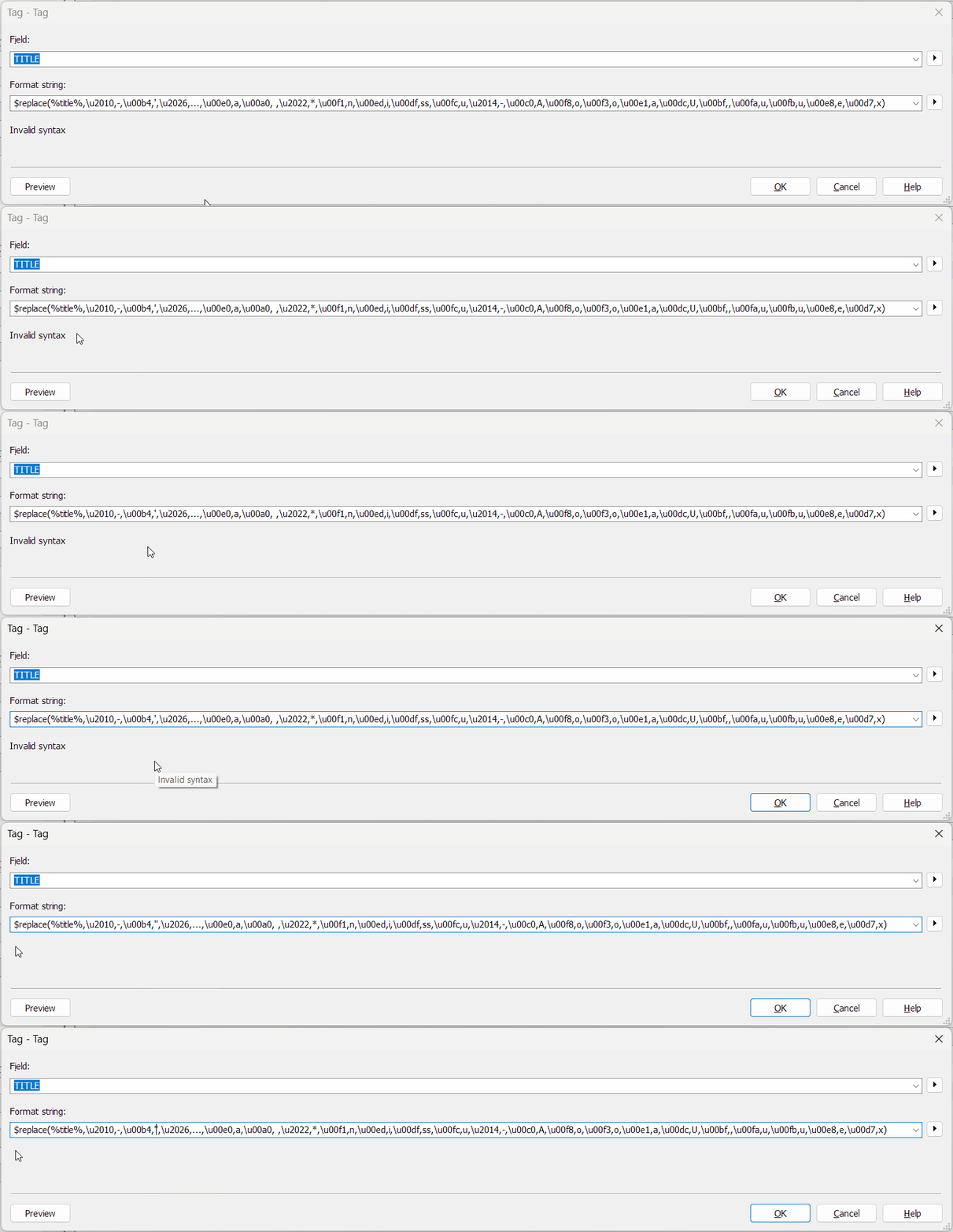
What do you get as replacement? Nothing? A wrong character? An error message?

In order to help you recognise what's wrong and how you can fix it, we would need to see real examples. Could you please show us a screenshot of what is currently happening for you?

If I see that correctly, you have the ' which is a special character in the list and which has to be escaped (or treated in an action of its own). So right now, you have an opened list but not a closed one.
You can test format strings in Convert>Tag-Tag.

Apostrophe
@sugargenius
You can open this AniGif in a new browser tab to see it at a larger size.

Bingo! That was the problem. How do I escape that?

From the documentation about special characters:

... If you want to output this character please mask it with an extra one ''.

when i use a single long $replace like:
1=$replace(%albumartist%,\u2010,-,\u00b4,',\u2026,...,\u00e0,a,\u00a0, ,\u2022,*,\u00f1,n,\u00ed,i,\u00df,ss,\u00fc,u,\u2014,-,\u00c0,A,\u00f8,o,\u00f3,o,\u00e1,a,\u00dc,U,\u00bf,,\u00fa,u,\u00fb,u,\u00e8,e,\u00d7,x)

it fails. Nothing is changed. When i put each replace as a separate action:
[#0]
T=5
F=ALBUM
1=$replace(%album%,\u2010,-)

[#1]
T=5
F=ALBUM
1=$replace(%album%,\u00b4,')

[#2]
T=5
F=ALBUM
1=$replace(%album%,\u2026,...)

[#3]
T=5
F=ALBUM
1=$replace(%album%,\u00e0,a)

They all work except for the u00b4 action because i didn't escape it correctly

Thank you! From now on I’m going to start here first instead wasting hours with copilot

Good idea :wink:

Please mark the best answer as the solution by clicking on the tick symbol :check_box_with_check: below the relevant answer.