Remaining Metadata in Tag Panel

I would really enjoy having a way to put an Extended Tags-type 'Metadata' overview at the bottom of my Tag Panel, but showing only those tags that my already configured fields do not cover.

Besides the fact that currently I have a huge empty area on the bottom there that is not particularly useful to me despite configuring the Tag Panel with fields of my liking, the other is that I routinely end up going through music that has tags I am not familiar with. The modal nature of 'Extended Tags' and the fact that most information overlaps with what I see in my Tag Panel already makes this screen frustrating to use. Selecting multiple items in 'Extended Tags' doesn't give information, and spamming the >> button in that tiny window to view file tags one by one still feels cluttered.

Depending on the original source and means of processing, there tend to be a variety of fields, sometimes for compatibility, but when using those in different software, they suddenly end up being used. Think of things like alternatively written fields like 'ALBUMARTIST', 'ALBUM ARTIST', 'ALBUM_ARTIST', 'ALBUMARTISTS' and so on, sort orders for various fields, unfamiliar fields for storing identifying information, copyright information and so on. While that is not a practical problem for some fields, I regularly end up with schizophrenic tags which makes it harder to find the music of my preference in the software I care for because suddenly the third-party software would be comparing a search query against a name in Kanji/Hiragana/Chinese/etc. which I am not capable of reading nor entering with my keyboard.

While it is possible to slowly accumulate and write a big action script to delete tag names that are known troublemakers, the issue with that approach is that it does not solve the core problem of gaining clear insight into the tags lurking inside the music files since it is separate from where I do most of my actual tagging in the Tag Panel. Having the ability to put the 'Metadata' section of Extended Tags at the bottom of my Tag Panel (but with the items already showing in the Tag Panel filtered out to reduce clutter) would give me a lot of insight and increased efficiency in a world where tags are a wild west of personal preferences.
If you have a list of fields that you always want to keep (and get rid of the rest) you could use an action that deletes all fields except those in the list:

While I understand where you are coming from, I think that is still very close to the bandaid solution I refer to in my final paragraph. It assumes that every tag I don't know is useless to me.

(I'll admit it would have been a good enough solution for me a decade or more ago, but I've become a bit more exacting and demanding in the way I utilize and sort my music library nowadays.)

Often, I find that there is useful information lurking in those tags that I may (or may not) want to put into the set of tags I standardize on. Often there are tags that are harmless to me that I'm quite happy to leave as they are. Finding information on a specific piece of music or album can be a pain, so I quite value whatever information is already present because it provides me with another avenue to further investigate older/niche/foreign music.

So this is as much about duplicate tags as it is about investigating unfamiliar tags effectively.

and

At the risk of making you more uncertain:
Are you aware that Mp3tag can't technically display all field names?

Even if you could display the Extended Tags at the bottom of your Tag Panel, this would not solve the problem of the fields not currently being supported.

Take a look at this list of unsupported frames from @ohrenkino:

I came to the same conclusion. What I usually do when I encounter different spellings/versions of a tag I want to keep, I follow this logic:
If the tag is already populated, simply delete the other versions.
If it is not, populate it with the content of the alternate version and then delete the other versions.

In practice I add an action group to my standard action groups that I run on every file. Here's a real world example for ALBUMARTIST vs. ALBUM ARTIST vs. ALBUM_ARTIST.

Automatic Approach

Action type: Format value
Field: ALBUMARTIST
Format string:

$if2($meta_sep(albumartist,\\),$if2($meta_sep(album artist,\\),$meta_sep(album_artist,\\)))

This retains multi-value fields for ALBUMARTIST if present and otherwise copies the content of ALBUM ARTIST or if that is also missing ALBUM_ARTIST into it.

Action type: Remove fields
Fields to remove (semicolon-separated):

ALBUM ARTIST;ALBUM_ARTIST

Manual approach

And should you instead wish to be able to view the offending tags and manually choose which parts of what tag to keep, you can add them to your Columns.
Columns:
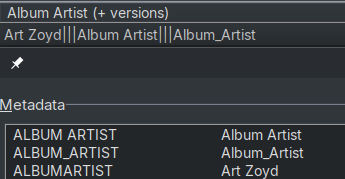
Name: Album Artist (+ versions)
Value:

$meta_sep(albumartist,\\)[|||$meta_sep(album artist,\\)][|||$meta_sep(album_artist,\\)]

Field: %albumartist%

This way, all values from ALBUMARTIST, ALBUM ARTIST and ALBUM_ARTIST are displayed in the same column, delimited by ||| (can be anything). When you edit this field, the result will be saved in ALBUMARTIST. However the content of the other 2 versions would still be displayed. Once you are done editing, run the Remove fields action from above to make the superflous fields disappear.

Example:

For me, my focus is on FLAC and its tagging format that is primarily text-based. there's a textual representation for anything in the Extended Tags window.

The 'unknown frames' issue does not seem to apply to the FLAC format I primarily settled on for my collection. If it does, I have never stumbled across it.

You are basically right about FLAC.

As far as I know, there are at least two cases for FLAC which are not yet supported by Mp3tag:

  1. METADATA_BLOCK_CUESHEET

and

  1. METADATA_BLOCK_PICTURE

So far, both cases needs an external tool to detect and remove them.

I would think that a solution that impacts all users as it modifies a central GUI element, should cover most use cases.
It looks to me as though esp. ID3 tags with possible APE tags and unsupported tag fields would not benefit from such an extra display.
I am also not really sure if esp. the problem of differently named fields like ALBUMARTIST vs ALBUM ARTIST would be represented accurately if a mapping is applied for FLAC files.

The Tag Panel is very configurable, and my suggestion is about 'having a way'. I'm not saying 'force it in for everyone'. As it is, the covers section can be enabled and disabled in the Tag Panel Configuration screen, and I imagine for people who have no use for a filtered view of extended tags, that could be implemented with a similar checkbox.

I know the implementation is never 'simple', but conceptually, I'm just asking 'CTRL+C the 'Metadata' group box in the Extended tags, CTRL-V it at the bottom of Tag panel, hook up a checkbox in the settings to show/not-show, and filter out irrelevant entries the tag panel already shows'.

Screen real-estate is precious. It bugs me that I have no effective way to use it in a way that would help me when the Extended Tags dialog is incredibly annoying/cumbersome for how I tend to use it to inspect my files, while the dialog itself blocks me from interacting with the main window.

I can't speak about how useful 'Extended tags' is for ID3 or APE tags because I have no (recent) experience with those, but if the 'Extended tags' dialog is useless to those formats and should not exist for that reason, then why was that dialog implemented in the first place? Because it is useful for some people who use formats that do use it. The same logic applies to my feature suggestion: just because it is not useful for every tagging format does not mean the suggestion itself does not have merit. If the APE format were to have a use for attaching bananas to music files to stop bitrot in tags from monkeys munching on the metadata itself, I'd be cheering on the addition of an optional food plate to the tag panel for people who have a need for that kind of hypothetical functionality so they don't need to dig into a properties dialog that does not fit their workflow.

Hell, I don't use the covers feature in the tag panel, but you don't hear me complaining about it existing for people who actively use it. So at the risk of sounding defensive, can you give more foundation for the argument? The Tag Panel at its core is meant to be extremely configurable and meet peoples varied needs, so why exclude a simple toggle just because it does not cover your format of choice?

Whether it is the regularly configured tag fields, or the extended tags.. their values are all text. A format the user can read. Edit. Cut. Copy. Paste. Why would such accessible and easily-modified 'Remaining Extended Tags' not have a place to be configured to be in the 'Tag Panel' in an empty area that is currently useless to me in the practical sense?

Dismissing the suggestion just because ID3, APE et al. are not capable of being suitably expressed in 'Extended Tags' is outright silly. Maybe a suggestion should be made to make 'Extended Tags' smarter about handling such tags, but I think that is an entirely different subject from what I ever asked for: a nice, non-dialog way to inspect & interact with the tags I haven't specifically created fields for.

That said, I do understand every feature has a maintenance burden, and if this feature is technically more complex than I give it credit for, I do understand such arguments against implementing such a feature. (But conceptually, it seems relatively simple to implement to me compared to many other things.)

Just wanted to respond in to say I did see your suggestions of ways I could approach my issue and I appreciate you understanding what I was trying to communicate. :slight_smile:

It definitely helps to deal with a part of the issues and I will explore it in more detail next time I go on a tagging binge, but it does not quite address my desire to easily inspect 'miscellaneous tags' when clicking a random file in my listing.

Right now, I select a file in the list, information appears on my tag panel, and I need to hit ALT+T to see the extended tags... and spend brainpower trying to figure out which entries of the 25+ match my tag panel, deal with the lack of consistent order, etc.

Ideally, I select a file, information appears on my tag panel which includes a 'miscellaneous metadata' field, and I immediately see only the handful of straggler tags rather than the 25+ fields that would likely pop up if I hit ALT+T. No extra action nor effort required for comprehension of what I am dealing with. I will immediately see other stuff I might be able to utilize to flesh out my regularly existing fields, or what I might want to cull, etc.

My suggestion would also be especially useful for multiple-file selections IMHO. I frequently use the indicator in both my Tag Panel and Extended Tags to figure out which files have matching metadata in a quick-and-dirty way, but there's often one or two files that are the odd one out. (Which might be exactly what I want to know so I can research the best way to tag that track!) Configuring columns or fields for a random one-off field I don't care about is an annoying bugbear when just Shift+UP/DOWN or Ctrl-clicking gives me quick visual feedback on whether a field in my Tag Panel has a shared value. Doing the same for Extended Tags currently requires every modification to the selection to have me go ALT+T and see whether it shows or the shared value. (Or alternatively just look at Extended Tags one file at a time and hit >>, but then you have the issue that the entries jump up and down excessively due to the variety in the tags that are present.)

(And yes, I know the Filter functionality exists and can assist with this. But my brain always forgets the syntax, and then I end up having to look it up, which is a lot more effort than just SHIFT+DOWN arrow, so I just use my basic/'universal' approach of selecting items and seeing how the UI changes as that works good enough without being yet another side-quest while tagging...)

Somewhat related: I'd like to see some of the more common Extended Tags, but below Album Art. Have you considered making AA a moveable field, instead of tied to the bottom?

You do know you can add and remove most fields from the Tag Panel? You can also move the panel to the bottom if you prefer that. So your screen real estate and the associated tags are fully within your control for visibility without calling up the Extended Tags view for your most commonly used fields.

You may still need the Extended Tags view occasionally to check for fields in use that you do not intend to exist in your library.