Hi Florian (and Community),
I noticed a recent change in the handling of UNSYNCEDLYRICS when pasting lyrics from Lyrics Finder.
Previously, Lyrics Finder → Mp3tag preserved the line breaks correctly. Now the lyrics appear as a single block of text in Mp3tag.
However, the line breaks are actually present in the text:
- Lyrics Finder → Mp3tag: lyrics appear as one single block.
- Mp3tag → Notepad: the line breaks are displayed correctly.
- Notepad → Mp3tag: the line breaks are again displayed correctly.
So the workaround is simply copy → paste to Notepad → copy → paste back to Mp3tag.
The field is UNSYNCEDLYRICS.
I am currently using Mp3tag v3.36 beta.6 (I also tested beta.2, with the same result). The same Lyrics Finder workflow worked correctly in earlier versions.
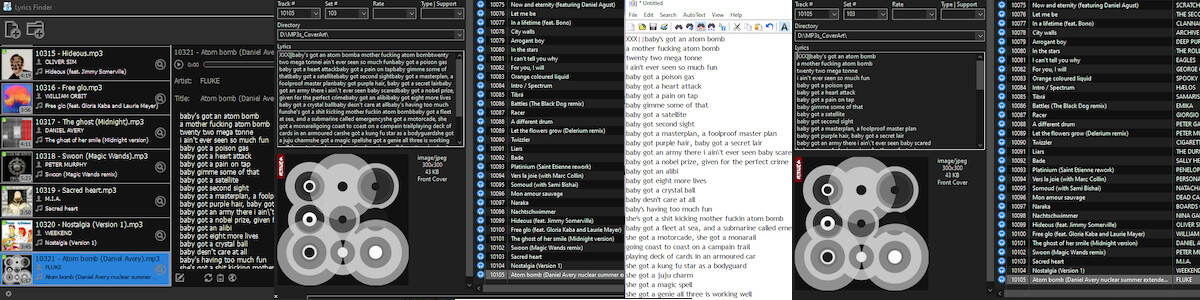
I am attaching a screenshot showing the four steps side by side:
Lyrics Finder → Mp3tag → Notepad → Mp3tag
This seems to indicate that the line-break characters are present in the clipboard content, but are not being interpreted/displayed correctly when the text is pasted directly from Lyrics Finder into Mp3tag.
Any help? Thanks!
Where can we find the "Lyrics Finder" mentioned?
If I see that correctly, then the Lyrics finder inserts the lyrics with 3 00 bytes at the end of each line.
AFAIK the bytes 0D 0A or only one of these two would be correct.
So if you use Lyrics Finder to write the tag field, the zero bytes will probably be ignored.
If you insert the lyrics via copy & paste into MP3tag then MP3tag writes them with proper line breaks.
I think that the origin for the problem lies in Lyrics Finder.
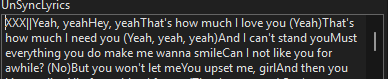
As an example the lyrics for Rihannas "Hate that I love you" as found in the file processed by Lyrics Finder:
This is the text that should appear:
Yeah, yeah
Hey, yeah
That's how much I love you (Yeah)
That's how much I need you (Yeah, yeah, yeah)
and what that looks like in a text field that ignores the zero bytes:
Couldn't say no to your conclusion. No tech knowledge to discuss that.
But... use Mp3tag since ever, and Lyrics Finder for some years, never happened that before.
Lyrics Finder (which has not many updates, can´t remember last), always did that right: searched for lyrics and auto inserted them right.
The question, to me, is why/what now? And why, when I copy the "block lyrics" and paste them on a text app it turns ok? Those bytes you mention should cause the same problem there too, not? And why copying them to that txt file, and then copying them again to MP3tag, it changes? I did not do anything, just copy+paste and then copy+paste back, and it gets ok! So strange...
There are some things to keep apart:
If you let Lyrics Finder process a file, it writes a tag field with the lyrics text in which the line breaks are encoded with zero bytes.
If you view the text in lyrics finder and copy it from there into the clipboard and then paste the contents of the clipboard to a suitable object in the tag panel, the text contains the correct line breaks encoded with the control characters for carriage return (13 / 0D) and line feed (10 / 0A).
I cannot shed any light on the evolution of Lyrics Finder, I see only the current state and I do not know whether your workflow changed.
Also I cannot say anything about error handling routines of other programs (e.g. other text editors or the clipboard) i.e. how the handle those 00 00 00.
In addition to the findings of @ohrenkino:
Just to be sure:
Are you using the latest version of Lyrics Finder for Windows (v1.7.2), released on 13 June 2026?
Went back to re-check it all. The plain answer is Yes! v1.7.2 (0614). LyricsFinder.exe (the installer) has the date of 26/06/2026. Previous MP3 files (before this "block text" thing), 3 of them, have the date of 28/06/2026: 10:34:53 to 10:35:36. So after update. No problem then.
Just explaining as I can (english is not my native language):
Up 'till today workflow is/was always the same, no clipboard in between. Open folder with MP3s files on Lyrics Finder, it ran and wrote the lyrics it found on those files. Again, as always did. Never used the "export lyrics to a TXT file". This time, today, they were in "block". Text editor I used to copy+paste and back was notepad.exe, the OS editor.
Cannot say anything more. Thank you for your time.
It is not necessary to use an editor - you can copy&paste the displayed lyrics directly from lyrics finder into a field in MP3tag and have line breaks.
Only if in MP3tag you look at the lyrics that lyrics finder wrote directly into the tag field, you will not see any line breaks and also no gaps there where the line breaks should be.
The use of triple zero bytes instead of CR/LF is definitely no valid format for such a text.
Definitely it's an issue with latest version of Lyrics Finder, as you found out. And your solution saves some steps, thanks. Hoping they solve the problem on next update. Just use 'cause it was the only one that could insert lyrics in an easy and smooth way... up till now! Thank you.
You're looking at the synchronized lyrics SYLT frame here, which uses 0x00 as sync identifier. So I don't see anything wrong here.
Does this tool also write unsynchronized lyrics to a USLT frame? If so, how are linebreaks encoded there?
UPS, my bad.
Yes, it writes USLT but inserts only a 0A (LF).

Yes, Windows text fields require CRLF to show a visible linebreak.
I thought I already had some kind of normalization in place and checked the code: it was removed during a refactoring back in 2024 and I'm not sure if I should resurrect this code, especially given that it would change LF to CRLF upon rewrites.
Since the linefeed characters is not lost during reading (even if not displayed), you could use Convert → Tag - Tag or an action Format value for UNSYNCEDLYRICS with
$regexp(%unsyncedlyrics%,\r\n|\r|\n,\r\n)
to replace simple LF 0x0A to CRLF 0x0D 0x0A if you prefer that.
For those wondering why \r\n should be replaced with \r\n:
The first \r\n may look redundant because it is replaced by the exact same \r\n. However, it is important because \r\n needs to be matched as a complete line break before the individual \r and \n alternatives are considered.
If the \r\n alternative were omitted, an existing Windows-style line break could be matched as \r first and replaced with \r\n, while the original \n would remain. This could result in an extra line break character.
So the order \r\n|\r|\n is intentional: it handles the combined \r\n sequence first, and only falls back to \r or \n when they occur on their own. The first alternative therefore doesn't change existing \r\n line breaks, but it prevents them from being processed incorrectly.
I think this topic is related. I also encountered this display issue a while ago with embedded lyrics in Mp3tag.
Since displaying Unix style \n as line breaks is not possible, my opinion is that they should be retained as they are instead of for example trying to auto-normalize them to \r\n, which might be unwanted in a Linux environment.
Would it be possible to handle this at the display level instead of normalizing the actual tag data?
For example, Mp3tag could treat both LF and CRLF as line breaks when displaying lyrics in the Windows text field, while keeping the existing line endings unchanged in the tag itself.
This would give us the best of both worlds: Unix-style LF line endings would still be displayed correctly under Windows, without automatically changing them to CRLF just because the tag was rewritten.
I realize that editing the text manually raises a separate question: what line ending should be used for newly inserted line breaks?
But perhaps that could simply follow the existing convention of the value (like preserve LF if the lyrics originally use LF only), while the GUI itself displays both forms identically.
That way, the display issue could be solved without forcing the tag data to use a particular line-ending convention.
But what if you want to correct LF to CRLF? With "hidden" line breaks like that they would go under your radar.
That's why there should be a distinction between displaying the lyrics and the actual underlying data. You are always modifying the existing data, not the way it is displayed.
The displayed lyrics are only a visual representation for you. You never actually see LF, CRLF as separate characters. So if you want to change an LF to a CRLF, you need to do that in the underlying data, not based on how the lyrics are displayed.
What I meant was:
If Mp3tag would display LF as a line break but still save it as LF (as per your suggestion), you wouldn't notice anything wrong and would miss the opportunity to correct it (if you wanted).
If Mp3tag would display LF as a line break and save it as CRLF, it would be an automatic conversion and you wouldn't notice. Good enough for many users, but also bad for some.
If Mp3tag would display LF as LF and save it as LF, then there would be no visible line breaks in the text. This would be obvious to spot, so you could correct it yourself (if you wanted).