Hi Everyone!
In reference to the Search Results modal: should there be a slightly enlarged preview of the album cover available as soon as the mouse pointer gets hovered over it?
Thank you.
Mp3tag 3.33 Beta 7 x64 (Standard Install)
Windows 10
Hi Everyone!
In reference to the Search Results modal: should there be a slightly enlarged preview of the album cover available as soon as the mouse pointer gets hovered over it?
Thank you.
Mp3tag 3.33 Beta 7 x64 (Standard Install)
Windows 10
Thank you for your confirmation @LyricsLover. Mine is invisible. Does it need to be configured to become active, or does it run on auto?
Can you see the (very) small cover picture in the first column?
Which Websource script are you using? (MusicBrainz? Discogs?)
Can you see the (very) small cover picture in the first column?
Yes, the icon-size pics are clearly visible.
Which Websource script are you using? (MusicBrainz? Discogs?)
Alternating between the two. Could the scripts perhaps have become outdated after a prolonged hiatus? How to check and verify?
AFAIK these scripts will be updated with every new Mp3tag-version, including beta-versions.
If you hover over these icons, nothing happens? Nothing at all?

Nothing at all. Previously, in a stable version, likely v3.32, the picture preview did grow ever so slightly in size — and heavily distorted at that, so as to render it quite useless.
The image preview settings started working after a clean install with MP3tag default settings effective. Discogs authorisation had to be renewed, but MusicBrainz did not require it.
Should there be an obtrusive difference in the preview image quality of Discogs (the worse) and MusicBrainz (the better)? Evidently, the very old carry-over app settings was at play causing this image preview issue.
However, to set up the app configuration from the very beginning is a very bleak outlook — having accumulated so many useful settings over the years. Could the issue be easily eliminated otherwise? (For instance, is it possible to edit the settings file?)
Side note: After restarting the app again with the old configuration settings effective, the images in the results pane again did not preview. For MusicBrainz, the small icons in first column are missing altogether.
All useful tips are most welcome.
PPS: If all else fails, is running running two instances of Mp3tag advisable? (Via which the copying and pasting of individual app settings could possibly be achieved.)
Please follow these steps in the documentation:
Only if you use one installed Mp3tag version and the other as portable installation.
Or all versions as portable versions.
It is not advisable to use multiple installed Mp3tag version (in different directories).
To be more exact:
You cannot use two different versions of Mp3tag simultaneously.
You can have different Mp3tag versions, but not let them run at the same time.
Thank you. I have the dual setup already (portable/standard), but would prefer not to copy and paste stuff across.
In addition:
You have posted a nice screen video of the preview images. Was it not for that, I would still be totally unaware of the fact. Do you utilise both services, MusicBrainz and Discogs, for polling album data? And, is there a noticeable difference between their preview images quality?
Is it possible to reset/refresh the Discogs and MusicBrainz authorisation keys for Mp3tag client side?
Yes
No, at least not for the kind of music I usually search for on both services.
Of course this depends on the currently available cover images at the source (and the cached versions that @Florian provides).
MusicBrainz does not require an authorisation key at all.
Unfortunately, I don't know where exactly the Discogs authorisation key is locally stored and how you could reset/refresh it.
Maybe someone else can help?
Hello, Everyone!
The non-display of album image preview upon hovering the mouse pointer over it, appears to be associated to in the polling of the album data from either one of Discogs (DC) and MusicBrainz (MB). If it is possible to get a clear reset on that aspect, I would be quite eager to try it for relief.
This issue is still ongoing, and I could really do with some assistance on this issue, as I am unable to fix it on my own.
Thank you.
•••
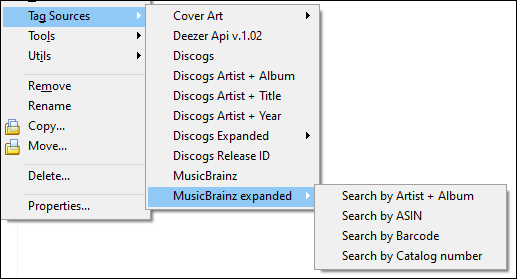
My Tag Sources context menu matches the following layouts. Does yours match?:
•••
•••
•••
•••
These are the official built-in Tag-Sources (Mp3tag v3.33-b7):
English GUI:
German GUI:
Any additional entries that you see for example as "...expanded" versions are user-built Websource-Scripts that you have downloaded and installed (or renamed) yourself.
Unfortunately, I can't help you with your display problem anymore.
Thank you @LyricsLover you proved to be a great help in other ways already. I keep on searching for a solution to retrieve those images. It is an extremely useful feature I never even knew existed. Today, while searching for answers, I saw this forum thread which puts you behind the very idea of image previews. Good show!
New introduced feature "Cover thumbnail" in Mp3tag 3.25c - General Discussion - Mp3tag Community
Have you seen the latest Mp3tag version 3.33-beta.8 with this change?
3.33-beta.8 (2026-01-16)
...
...
Maybe this could help in your case?
Yes, I had seen and installed v3.33-Beta.8. Thank you for taking time to remind me.
The image previews are certainly a pleasure to have and to utilise — especially seeing that I was unaware of its existence before.
Grateful as I am for being able to use this feature now, I am still left pondering why the image preview quality for MusicBrainz is much better than that of Discogs. And, what does the poorer quality stem from, and, can it be improved upon?
I just checked the current rules on Discogs for picture size and quality:
Size And Quality
13.2.1. Images should be larger than 150 pixels wide, with a maximum size of 4MB. Any image less than 150 pixels wide, or with file size larger than 4MB, will automatically be rejected by the server. Preference goes to larger images with more detail over smaller thumbnails. Images shorter than 150 pixels are acceptable as long as they are relevant to the release / artist / label and follow the other image rules.
I'm not sure where the pictures used in the Mp3tag Websource Scripts are taken from.
I found this Discogs staff member's post from a year ago about the 600-pixel picture PREVIEW limit:
Q: I wonder if theres a way we can view anything higher than the default auto-resized 600px version?
There is not. Discogs has set the maximum display size to 600x600px, mainly to get around copyright claims, as a thumbnail image for the purposes of recognition falls under 'fair use' rules, and is of no use in illegally reproducing artwork.
It's frustrating, as it makes it difficult to read text on sleeves, but that's where we are.
AFAIK there is no size- or pixel-limit for pictures on MusicBrainz. The pictures itself are stored in the CoverArtArchive.org
I just realise that I might have answered this already via email:
The preview image is a scaled version of the smallest image the tag source is providing. So it's expected that the image quality doesn't match the final actual image — this is only downloaded once a result is selected.
Discogs provides a thumbnail version of the cover (usually 150x150px, example), which is smaller than the one MusicBrainz is providing.
I just realise that I might have answered this already via email.
You did, in fact, thank you. Although, I was not yet aware of the many ins-and-outs of the Discogs image management. I am still left with the question whether it is possible to get that Discogs preview resampled to improve its quality before displaying it? Perhaps by utilising A.I. for it?