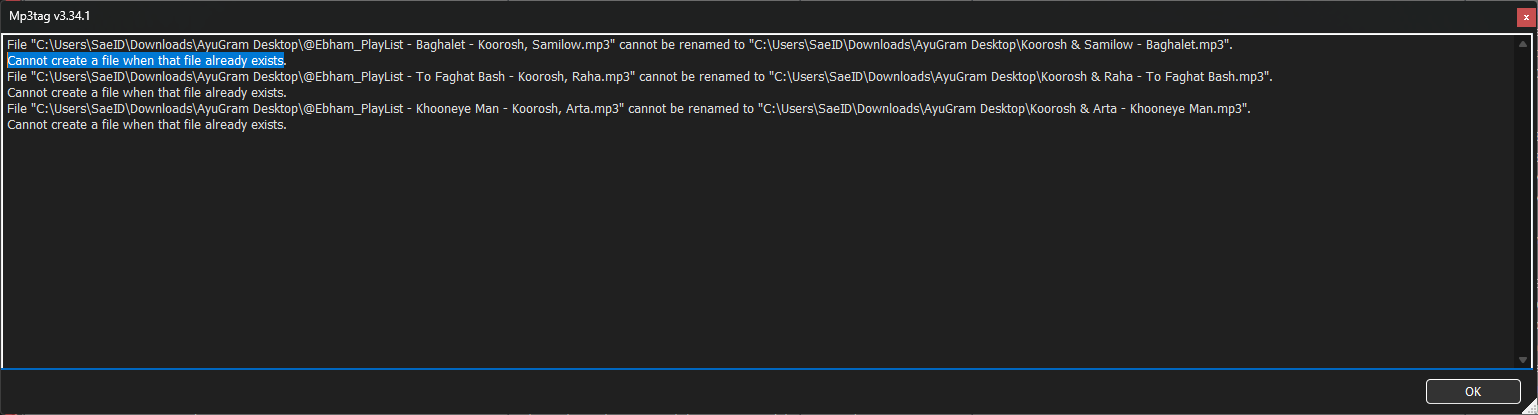
When renaming multiple files in Mp3tag, if a destination filename already exists, I get this error:
"Cannot create a file when that file already exists."
Currently the process stops or shows the error without giving any action options. I request two features for such conflict situations:
A button to move the conflicting files to a specific folder (e.g., a "Duplicates" or "Conflicts" folder) so renaming can continue.
A button to move the conflicting files to Windows Recycle Bin automatically, so they don't block the renaming process and can be restored later if needed.
This would help users cleaning up large music collections with duplicate filenames.
This will only work if there is just one duplicate - as soon as the naming pattern would lead to several files with the same name, it would move the problem only 1 file further.
IMHO, it is always a question of how accurate the tag data is. A name conflict would always lead to further investigations, as far as I am concerned:
Is it a real duplicate or do only the tags lead to the same name?
Is my naming pattern OK or should I add further information so that the names become unique?
Esp. if in a
it would be a pity if suddenly numerous files would be moved away from the original location and the restauration would lead to added effort.
Thank you for your feedback, but I think there might be a misunderstanding about my request.
1. I am not asking for a manual one-by-one solution
I am dealing with a large music collection where I am renaming files based on tags using the format %artist% - %title%. When Mp3tag encounters a file with the same tag data, it creates a file name that already exists. In that case, the file is truly a duplicate in terms of content (because the tags are identical).
2. I am asking for an automatic batch solution
When there are 20 duplicate files (with identical tags), I don't want Mp3tag to stop or ask me one by one. I want it to automatically move all conflicting files to a "Duplicates" folder or the Recycle Bin in one operation, so the renaming process can continue for the remaining files.
3. "Moving files is bad" does not apply here
You mentioned that moving files away from their original location would cause trouble. But I don't want to delete them permanently. My request is to move them to the Recycle Bin so they can be restored later. This is a safe automatic cleanup, not a permanent loss.
4. Real-world scenario
For a user with 5000+ music files, manually checking every single conflict is impossible. An automated "move to folder" or "move to recycle bin" feature during the naming process would be a huge time saver and a logical, efficient solution.
So I respectfully believe my request is valid, practical, and well-suited for Mp3tag. It would help many users clean up their music libraries without any manual intervention
Your suggestion has been noted, no doubt. But so has the linked one with almost the same title and description of the function.
There have also been numerous discussions about the treatment of alleged duplicates, see e.g. here (seriously)
In general: AFAI get the summary, the same data in the tag fields does not qualify to identify a real duplicate.
So for serious collectors it would be mandatory to investigate for each file if it is a real duplicate or just the tag data is insufficient.
As you see that the feature has been asked some time ago (and there are other threads that suggest other functions to work around the problem of duplicate file names) I suggest for the meantime the following:
Rename all new files with Convert>Tag-Filename
Format string: %artist% - %title% (%_counter%)
Then move them to the new location with the method that you have used before and now all files that cannot be renamed stay with a number in parenthesis.
You can now filter for these files with %_filename% MATCHES "\(\d+\)"
and check if they are real duplicates.
I just tried to show you a workaround until the feature gets implemented.
But looking at threads that date back to 2010 that also ask for a different treatment of duplicate filenames, e.g. here:
I cannot say when the feature will be available. So until then ...