7 posts were split to a new topic: Overwrite existing cover when importing from Apple Music or iTunes
I am having an issue when I try to download the id3tag for songs. The error is ERROR(L484/findline): text not found.. Does anyone know how to correct this issue? Thanks.
Hello,
this error means that something is wrong with the script, and it's not finding the expected data.
Please try the following general troubleshooting steps:
- replace the current script you're using with the most up-to-date ones, and try again;
- if you are still getting the same error, post the following information:
> in which script are you getting the error (Apple Music, iTunes, Apple Music classical, etc.)
> your OS (Windows / Mac);
> what version of Mp3Tag you are running the script in;
> if possible, what query were you using that generated the error (ignore this if it happens in every search).
If the issue persists, this info will help guide the developer to a solution.
Please see below. Seems this started with the latest version. Thanks.
Operating System

Version of Apple Source

Settings and version of Mp3Tag

Finds the song

Error when I pick the song to get tagged

Thank you for the screenshots.
I'm not the developer of this script, and I won't modify it without permission.
Using the Windows version of the script, I'm also having an error using the search terms you shared.
However, in this instance, selecting/searching the album where the song 'Mala Suerte' is present - 'Latinaje' - will return the correct tags.
There seems to be an issue when getting tags from 'Song' entries, but not with 'Album' entries, since I'm seeing the same error with other files (in Windows).
As a temporary measure, if you can get data with 'Album' results in macOS, you can make do with using 'Album' instead of 'Song' as tag source (seen in the 'Kind' column), until the developer addresses this.
Hope this helps.
Try now with the latest version
The latest version is working for me. Thanks!
The latest version is working for me as well. Thank You.
Thank You for your guidance.
I got my User-media-token
where should i fill it in ?
Thanks for this amazing script, it works flawlessly! One tiny request, would the COMPILATION, XID, ITUNESGAPLESS, ITUNESGENREID, and ITUNESCOMPOSERID tags be possible to add? For reference, I'm using the Apple Music web script. Also I noticed there is no Canada storefront, is there a way to add it? Thanks again 
The latest version of the Apple Web script i.e. 3.20, doesn't write the UPC, ISRC value nor Language value. Even though all are available on the website.
Is there a way to append the script to add the following two values ?
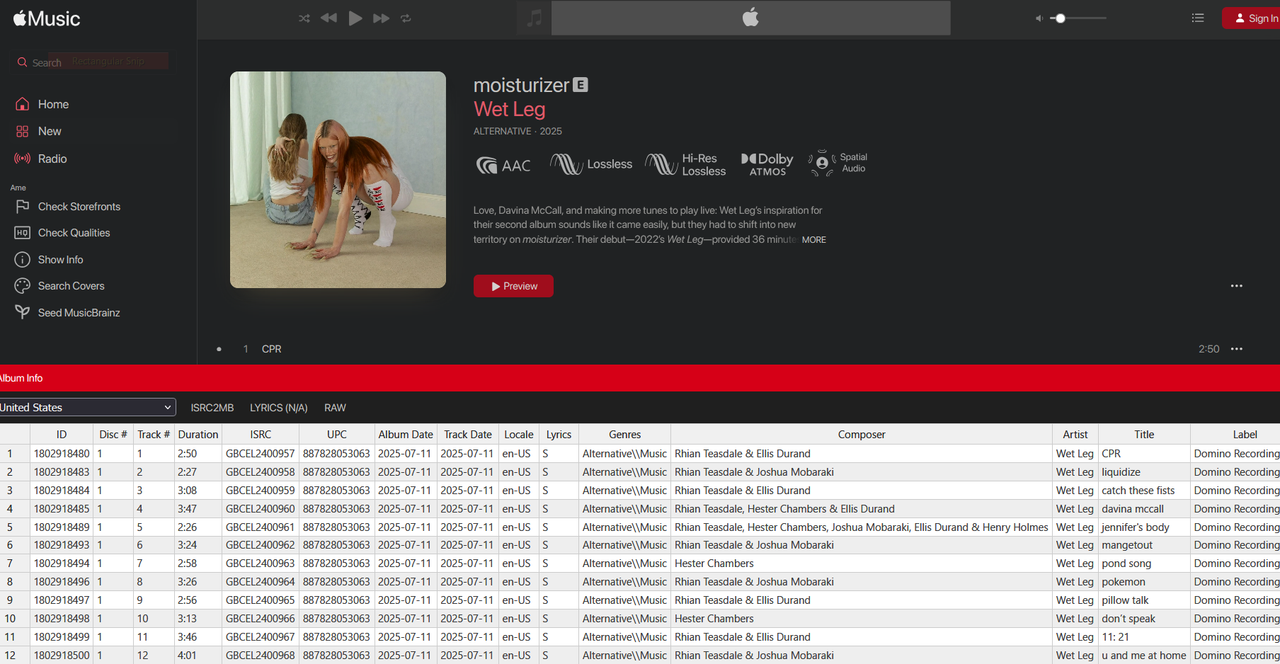
Kind regards
Don't show images, but links if you think this is actually available on the Apple Music website. All fields are available from the API and you can use the API script for that.
@AreDigg
I apologize if I offended you in any way, I assure you that was not my intension. I just used a Javascript in TemperMonkey that shows album's metadata on the Apple web page and ISRC, UPC and locale seems to be there. I don't know any scripting so it's beyond my skills to use the API version.
Thank you for your fabulous work.
Kind regards
It performs lookup into Apple API. It loads and show it into your web-browser, not the Apple Music web-page. MP3Tag don't support Javascript, that is why you have to run something external to authorize access to Apple API.
Thank you for the response once again. Seems like the API way to go is the only solution. I will research how can I make use of your API script as I don't know how to use this in MP3Tag.
Many thanks for your continued support and work. Highly appreciated.
Kind regards
Got the API version of the script working. It has all the tags that I requested. It's much more complete and mimic the iTunes tags as closely as possible.
Thank you very much for your phenomenal work.
Is it possible to explore the possibility to allow the javascript handling within MP3Tag itself so we don't have to run a separate python script ?
Many thanks and kind regards
@ceo54 - Is there a chance you could share any of the details about how to get the AM API script working? I've been trying and cannot figure it out. Any help would be appreciated. Thx.
Hello Mr. Brian.
Yes, absolutely. But it's 3 AM and I have to get up early tomorrow for Friday prayers. I shall do it Tomorrow evening.
Kind regards
A brief guide to use @AreDigg API script on Windows.
Install Python from here -> Download Python | Python.org
Make sure to check Add to path during installation.
Open Windows Terminal, type python --version
If the command returns the correct version then it installed correctly and we're ready to move to the next step.
Get your access token from your Apple account. You need to elevate your account to developer to do this (costs some quids based on your region)
Once your account is elevated, go here ->Sign In - Apple
Create a Musickit identifier, make sure to choose Musickit when creating an identifier.
Once your identifier is created, go here ->Sign In - Apple
Generate a new key, make sure to enable Musickit capability
Download your key file xxxx.p8
Go to ->https://jwt.io/ to generate the access token from your key file
(Remember your keyfile will be out in the open, you can also use other methods but since I personally didn't care, I chose this method as this was straight forward and simple)
Now grab @AreDigg API script. Extract the archive. Open mp3tag_proxy.py with Notepad++
Search for Authorization, replace your access token with TOKEN
Make sure to put the entire string in quotation marks
It should look like this or else you will get errors when script attempts to access the metadata
"Authorization": "Bearer your_access_token",
Pay attention to punctuation and spaces, save the script.
Inside the same archive, you should also find localhost.pem, copy this file to temperory location, change the extension from .pem to .crt
Double click this .crt file to install. Choose Local Machine & place the certificate in this folder Trusted Root Certification Authorities
You can open Certificate manager on Windows and it should show in the specific folder as localhost
(Make sure you trust the author, @AreDigg , you're totally doing this at your own risk, I trust the author so I did it, what you choose to do is entirely up to you)
Bact the folder where we extracted the script's files. Move the Apple Music 4.src to MP3Tag's sources folder.
Now run the proxy by opening the terminal, CD'ing to the location of extracted files and type mp3tag_proxy.py
Keep the terminal running, open MP3Tag, open some music files, select the new script that you recently moved from sources folder. Watch as you fail.
Go back, read everything slowly and repeat the process until MP3Tag can call the data from the API, once you see that magical preview Window of tag data, you're all done.
Give credits to the author, comment or make suggestion.
DISCLAIMER:
The above method was what worked for me on a Windows machine. There are other ways to do this too but IF you're following above guide, make sure you understand the risk of sharing your key file on the open web and installing SSL certificates from Random scripts you downloaded from the web. If anything goes wrong or anything else happens, it's entire on you. I will have absolutely no responsibility.
If you have read this far, you're surely going to try this anyway. In that case, here are couple of tricks you can do make things easier.
Get Apple developer account from Argentina, Turkey or India. It would (not entirely sure) cost you much less than what it costs from EU/US
The Access token expires every once in a while, so you need to generate a new one using your xxxxx.p8 file like you did before.
For the last time, I don't take any responsibility for anthing that may or may not happen following this guide. This is the method that worked for me. There must be ample ways to do this based on the system configuration, coding skills, geo-location and stuff.
And please don't quote me on anything.
`
2 Likes