Will there be a script update? 
Well of course not!
I am kidding, I will add the new version in a minute
5 Likes
I played around with the code a bit and it’s working:
apple-music-mp3tag-script.zip (11.7 KB)
I get the following error…
Settings of the Tag Source “Apple Music” Contain a syntax error:
ERROR(Settings): expected value, got ‘&’ (38)
See Scripterror.log for details…
Please read from post #469 and follow the steps I've outlined.
THANKS!!! I will remember that going forward…
Subject: Bug report: Apple Music Classical for MP3Tag (Web) 1.00 (26-03-2025) is no longer working
Message: Hi there,
I’ve been using your “Apple Music Classical” script and it’s been very helpful. However, I noticed that it seems to have stopped working recently (21-04-2026).
Could you please take a look and see if it’s possible to update it? Thank you for your time and for creating this script!
Best regards,
1 Like
I will take a look when I have time, it may be same changes as on main Apple Music web so hopefully trivial.
2 Likes
I did an update, it should work now, hopefully without errors.
2 Likes
Hi,
Thank you so much for the quick fix! I’ve tested the update and it’s working perfectly now. I really appreciate your time and effort in maintaining this script.
Best regards,
Hello, not sure if anything can be done about this, but I just tried using this today and I noticed the ITUNESARTISTID field is combining all the artist ID's instead of separating them. I attached a screenshot to show what I am referring to. It is saving all the ID's in the same tag. Any help would be appreciated!
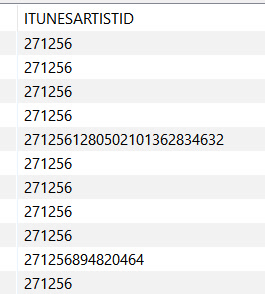
1 Like
@AreDigg Hi, I came across something weird, Using the Itunes Api script, I tagged a song, the ITUNESALBUMID and ITUNESCATALOGID matched the song but when I pressed OK, ITUNESCATALOGID changed. Did Apple change something that messed up the script?
The Song is 真夏のイエティ - Single - Milky Monsterのアルバム - Apple Music Thanks!
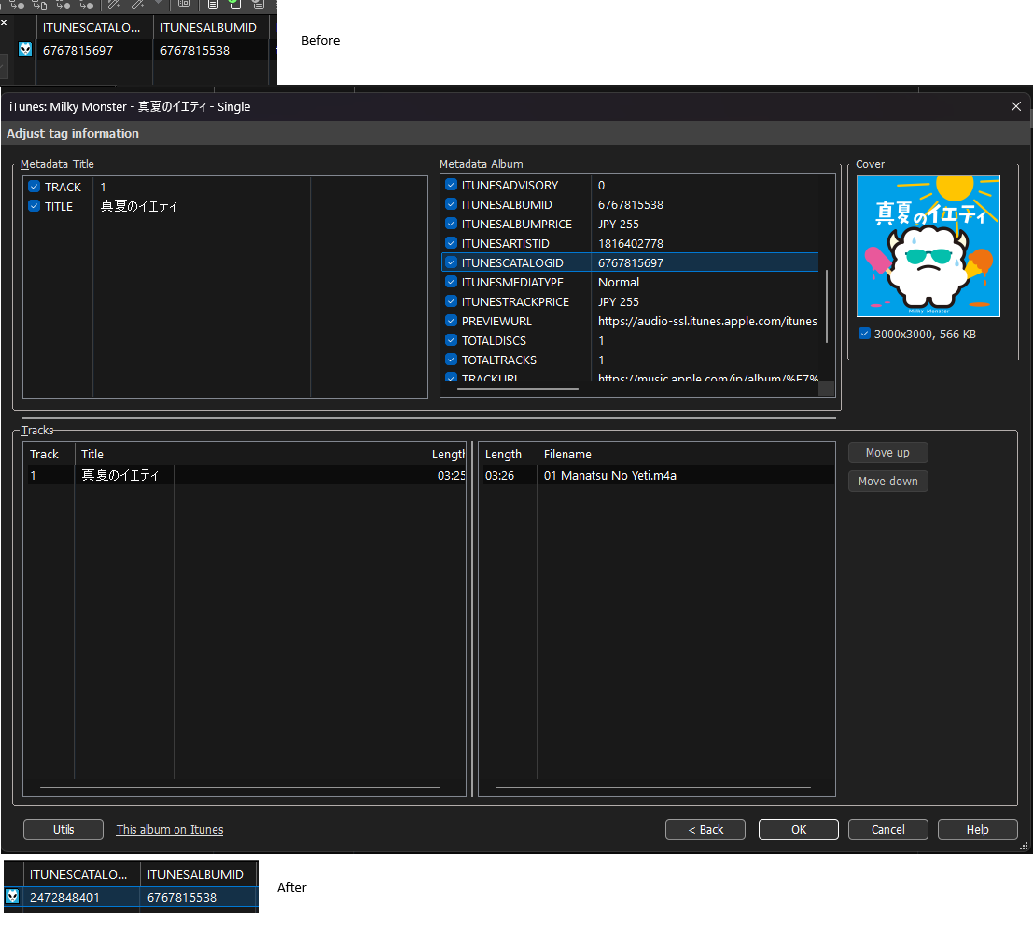
You need a newer MP3tag, see here:
1 Like
Ah, It was that easy! Thank you so much 
Hi! I installed "Apple Music 3 (Web) Apple Music for MP3Tag (Web) 3.21.zip (25.7 KB) (13-02-2026)," but it isn't working. I installed the extension correctly, but whenever I try to use it with any country, it throws an error involving the "&" symbol. I think it might be an issue with the original file or something similar. Could you help me fix it or provide an updated link? I'm getting really desperate at this point because I'm trying to follow a tutorial for adding animated artwork to the file, and I really need your extension! 

Are you on Windows? Try to use 7-zip
There is an issue with the search. A while ago, I created a custom .src file that searched using SearchBy ITUNESALBUMID, and it directly sent me to a window of the corresponding album.
However, for the past couple of months, it no longer does that. Instead, it opens a search results list containing albums with names that are numbers, rather than navigating directly to the album (this also happens with the normal Apple Music USA .src file).
If you created your own WS script, then you have the means to enable debug output, check out were the issue lies, and patch it. Since it's your work, you are the best suited to troubleshoot it.
If your script isn't publicly available to the community, there's not much the rest of us can do.
FYI, searching the iTunes database for ITUNESALBUMID no longer works (for over 6 months); id query has been disabled at server level.
**How can I force Apple Music to use the US catalog instead of the CN catalog without a proxy?
**
Apple Music’s content and catalog are generally determined automatically based on the user’s geographic location in order to comply with local laws and content policies. However, I would like to use the catalog for a specific region —for example, by forcing the /us/ path instead of the default /cn/ path. As far as I understand, this cannot be achieved without using a proxy. Is there any way to do this without a proxy, perhaps by modifying the Apple Music web source script or adding a parameter to the URL?
Try using the web source if you haven’t. When you install it you should show many options for different regions when you attempt to select the source to use it for tagging. For example I can select US or the English version of the Japanese catalog among the English options. Are you not seeing that? If not, I suggest removing the web source and downloading a new copy. I’m away from my Mac, but there were probably 20-30 region options in the source at least, as I last recall.